
Introduction
House flipping is exhilarating! Turning a tired property into a dream home—and pocketing a profit at the end—has its thrills. But here’s the hard truth: without precise planning and bookkeeping, those profits can disappear faster than you expect.
Over the past year, I’ve managed multiple flips at once, and one lesson stood out: organized finances are the backbone of a successful flipping business. While I still use Google Sheets for project planning, I rely on QuickBooks Online to keep my actual real estate investment finances structured, clean, and lender-ready.
In this guide, I’ll share exactly how I set up QuickBooks for house flips, using the same strategies I apply in my own business.
1. Choose the Right Version of QuickBooks for House Flipping
Not all accounting software is built the same. Platforms like Wave and Xero also have strong features and can work well depending on your needs. I ultimately chose QuickBooks Online after evaluating its features, integrations, ease of use, and how well it’s known among accountants.
- I recommend QuickBooks Online Plus because it includes Class Tracking, which is essential when you’re juggling multiple flips.
- Instead of creating separate accounts for every property, Classes let you keep one clean chart of accounts and still generate reports by property.
- This saves you from cluttered bookkeeping and makes analyzing property-by-property performance simple.
2. Set Up Your Chart of Accounts for House Flipping
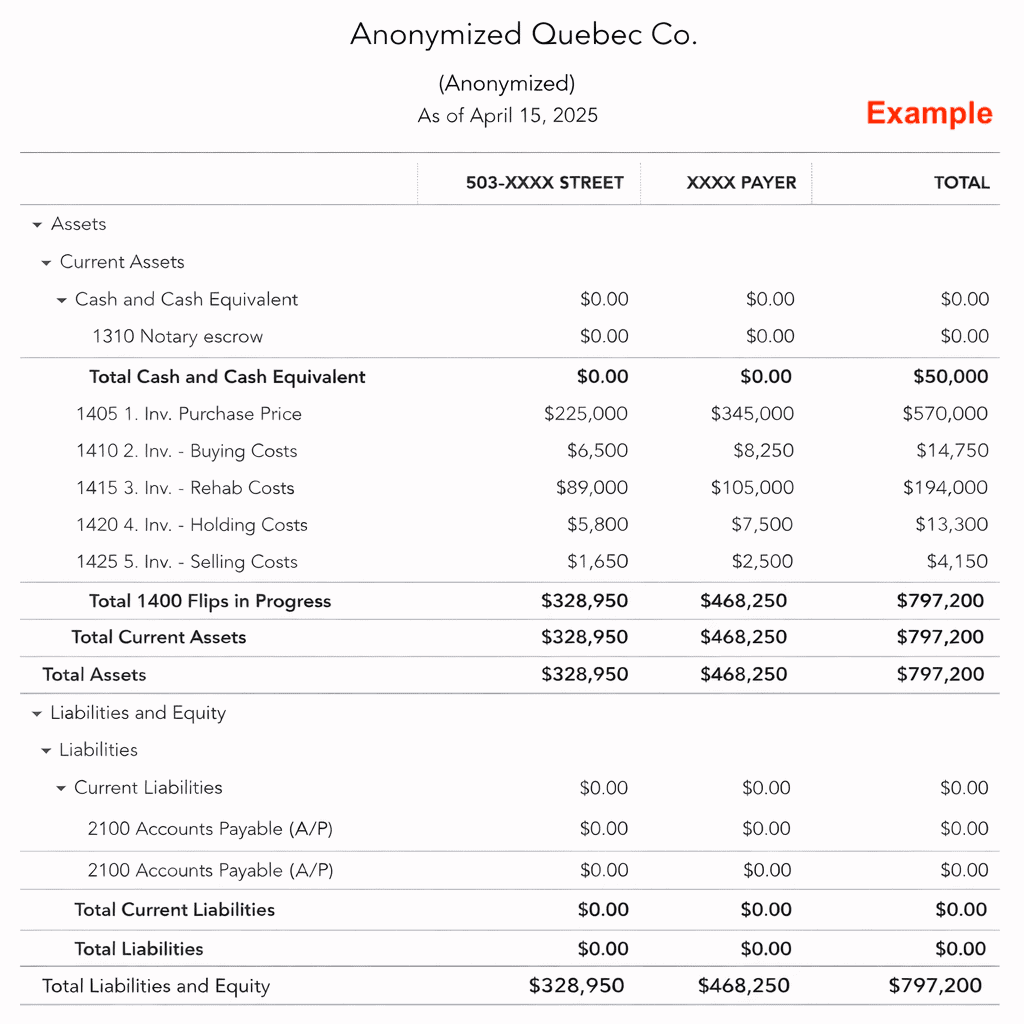
In the flipping business, every property is treated as inventory. Money spent on a house before selling it isn’t an expense—it’s an investment. Only when you sell the property does everything flow into Cost of Goods Sold (COGS), giving you a clear picture of gross profit.
Recommended Chart of Accounts for House Flips
ASSETS
- Flips in Progress (Inventory Account)
- INV – Purchase Price
- INV – Debt Service
- INV – Buying Costs (notary, inspection, legal fees)
- INV – Rehab Costs (renovations, contractor payments)
- INV – Holding Costs (taxes, insurance, utilities, snow removal)
- INV – Selling Costs (agent commissions, staging, survey)
LIABILITIES
- Private Lenders
- Mortgages Payable
INCOME
- House Flipping Revenue
EXPENSES
- COGS – Purchase Price
- COGS – Debt Service
- COGS – Buying Costs
- COGS – Rehab Costs
- COGS – Holding Costs
- COGS – Selling Costs
👉 The key here is precision. Every QuickBooks entry should mirror your deal analysis spreadsheet.
3. Use Class Tracking to Separate Flips
Assign one Class per property. This way, you can instantly pull Profit & Loss reports by flip. Lenders, partners, and investors love seeing clean, property-specific numbers—it builds credibility and saves hours of manual tracking.
Pro tip: You’ll also avoid the headache of reconciling multiple bloated accounts. One streamlined chart, multiple projects tracked.
4. Stay Meticulous With Bookkeeping
Consistency is everything. Here’s my process:
- Record bills and expenses immediately, always linking them to the correct inventory account and Class.
- Update your Google Sheets forecasts in parallel to monitor budget vs. actuals.
- When selling a property, post a journal entry to move costs from Inventory into COGS and record the sale as revenue. This is the moment your profit shows up clearly!
5. Avoid These Common QuickBooks Mistakes in House Flipping
Even experienced flippers slip up. These are the most common QuickBooks errors I see:
- Treating flip costs as expenses instead of capitalized improvements.
- Applying Classes unnecessarily to checking accounts, A/R, or A/P. No need to track these by “flip” project.
- Overcomplicating things with QuickBooks Online’s Customers or Projects (not needed for flips).
- Skipping monthly reconciliations—a surefire way to miss errors.
Conclusion
Setting up QuickBooks Online for house flipping isn’t just about bookkeeping—it’s about running your business like a pro. When your numbers are accurate and structured:
- You get clear reports that guide smarter decisions.
- You gain confidence presenting financials to banks and private lenders. (My banker truly was surprised, and it provides instant credibility that you know what you’re doing.)
- You save yourself stress at tax time.
In short, the right QuickBooks setup turns flipping from chaotic to predictable. If you’re serious about scaling your flipping business, this structure is a must.
I’ve seen firsthand how much smoother projects run with the right financial systems in place. If you’d like to dive deeper into setups or strategies, feel free to reach out—I’m always glad to share what’s worked for me.